Active Immersion

Learn English from the internet you already use.

Active Immersion is a Chrome and Firefox extension that hides your native language while you browse, corrects the English you write and turns new words into quick reviews. About 10 minutes a day, with no extra app to open.

Ready to install
  • 7 days free, everything included
  • No card to start
  • Cancel anytime
Add to Chrome 7 days free

5.0 on the Chrome Web Store

Sites changed 3 example
12 − 10 hábitos simples que vão mudar a sua rotinaauto-dubbed
13 How I learned English by watching series
14 + 10 simple habits that will change your routine

Videos in your language, and auto-dubbed ones, leave your feed.

12 min English today134 words24 days streak

What is a day with Active Immersion like?

With Active Immersion, your routine stays the same and only the language changes: the YouTube, Gmail, Wikipedia and ChatGPT you already use become English practice. Here is an example day: example day

  1. 08:10
    YouTube

    Recommendations in your language

    Only English videos, without the auto-dubbed ones

  2. 09:40
    Gmail

    I am agree with your proposal.

    I agree with your proposal.

    “Agree” is already a verb.

  3. 12:30
    Wikipedia

    Stopping to look a word up in a translator

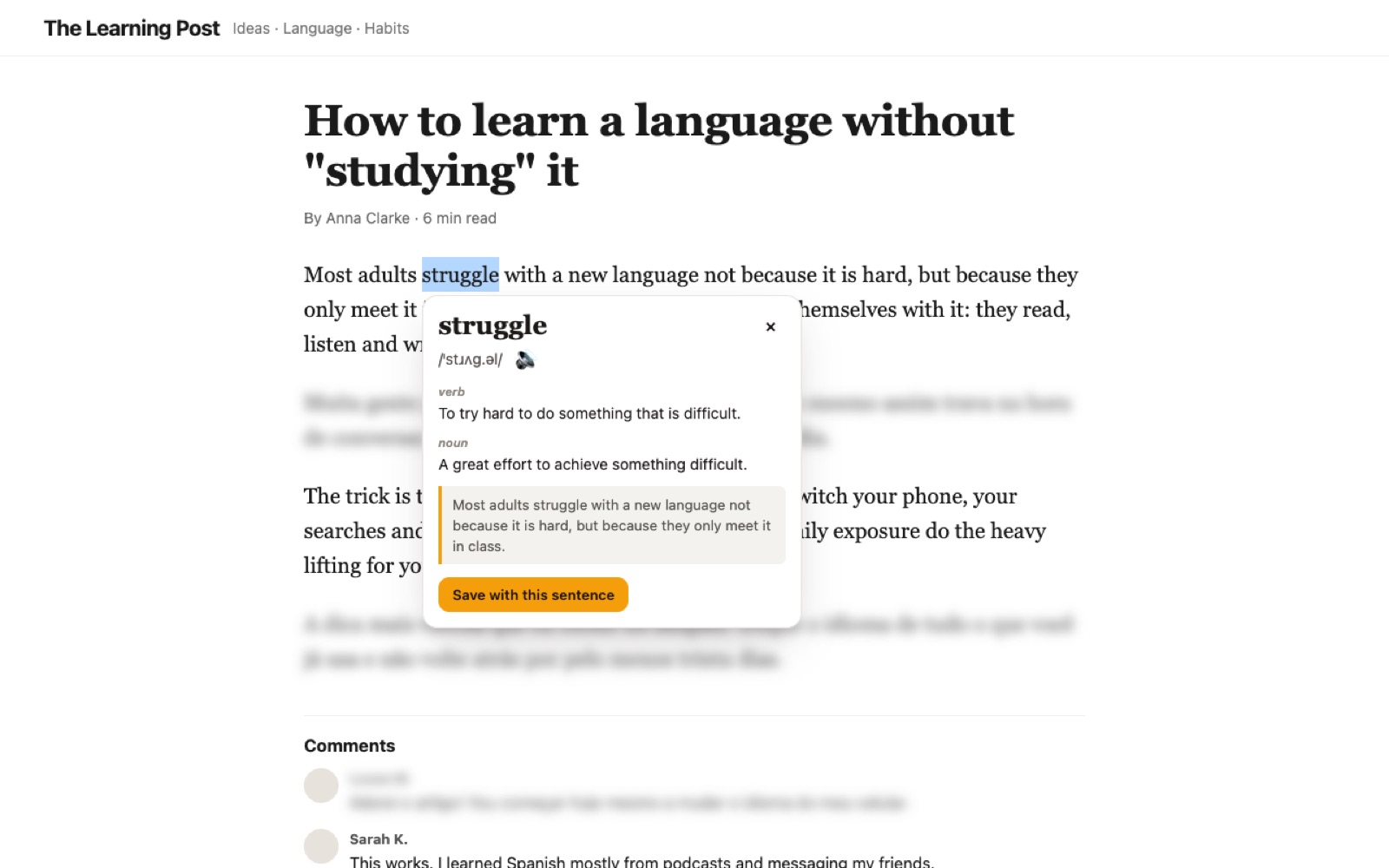
    Double-click “struggle”: meaning, pronunciation and a saved card

  4. 15:15
    ChatGPT

    Asking in your language

    Asking in English, with a hint when you get stuck

  5. 21:30
    Review

    Forgetting it all by the weekend

    10 minutes of review, and the streak climbs to 25 days

How does Active Immersion work?

Active Immersion is a browser extension that does three things automatically on any site: it hides your native language at three levels (None, Partial and Total), corrects the English you write with the Writing Coach, and saves new words for spaced-repetition review (the FSRS algorithm).

How does Active Immersion hide my native language?

Active Immersion detects your native language inside the browser and, depending on the level you pick, blurs it, translates it or removes videos, results and posts, including YouTube’s auto-dubbed videos. To use your language on a site, one click on the extension icon allows that site.

Your language is blurred or translated, and you click when you really need it.

youtube.com
  • How I learned English by watching series
  • 10 hábitos simples que vão mudar a sua rotinayour language hidden
  • The history of the internet in 20 minutes
  • Receita de pão caseiro fácil e rápidayour language hidden
  • A beginner guide to cooking pasta at home

How does the Writing Coach correct my English?

The Active Immersion Writing Coach reads the English messages you send on ChatGPT, Gmail, WhatsApp Web, Slack and other sites, gives a score from 0 to 100, shows each fix and explains why, in your language if you like. The Writing Coach never reads passwords, forms, banks or government sites.

mail.google.com

−Can you send me the report until friday?
+Can you send me the report by Friday?

“Until” is about duration; for a deadline, use “by”.

72
The Writing Coach correcting a message

How does Active Immersion help me remember words?

In Active Immersion, double-clicking any English word shows its meaning, pronunciation and an example, and saves a card with the sentence you found it in. Reviews use spaced repetition (FSRS) to bring each word back right before you would forget it.

Most adults struggle with a new language because they only meet it in class.

Double-click a word

struggle “I still struggle with phrasal verbs.”
The extension showing the meaning of a word on a page

How is Active Immersion different from an English course or app?

The difference is where practice happens: courses and lesson apps create a separate time to study, while Active Immersion turns what you already do in your browser into English practice. For context, Brazil sits in the low-proficiency band of the EF English Proficiency Index 2025, with a score of 482. Source: EF EPI 2025, Brazil

The usual wayWith Active Immersion
Studying at set times, when you can Practicing all day, in what you already do
Textbook sentences you will never use Your YouTube, your email, your conversations
Corrections only when a teacher looks Corrections on every message you send
Memorizing vocabulary lists Reviewing each word on the right day, with the sentence you saw it in
One more app to remember to open Nothing to open: it happens in your browser

Can I pause Active Immersion?

Yes. Active Immersion allows breaks of 5, 10 or 15 minutes (or longer), asks for a few seconds of breathing first and ends the break on its own. Commitment mode locks your level for a few days, and allowing your language on a site is still one click.

  • Allow your language on a site: one click
  • Timed breaks that end on their own
  • Alt+Shift+I pauses on any page

Who made Active Immersion?

Active Immersion was created by João Palma, who is learning English with Active Immersion.

João · creator of Active Immersion
I built Active Immersion because I’m learning English and wanted to practice in what I already do every day, not only in class. I use it every day, and my English teacher thought it was amazing.

5.0 on the Chrome Web Store

How much does Active Immersion cost?

Active Immersion costs US$ 4.99 a month (R$ 19,90 in Brazil) after a 7-day free trial with everything included and no card. The subscription is billed through Stripe and can be cancelled anytime.

  1. Day 1

    You create your account with your email and the 7 free days start. No card.

  2. Days 1–7

    Everything included: immersion, corrections, reviews and Insights.

  3. Day 7

    You decide: subscribe for US$ 4.99/month or let the extension stop.

  4. Anytime

    Cancel under Account → Manage subscription.

All checks passed
US$ 4.99/month

about 17 cents a day
In Brazil: R$ 19,90/month

  • 7 days free, everything includedpassed
  • No card to startpassed
  • AI corrections and translations every daypassed
  • Reviews, daily missions and Insightspassed
  • Cancel anytimepassed
Start the 7 free days

Is Active Immersion safe for my data?

Yes. Active Immersion shows no ads, uses no tracking and sells no data; text goes to AI only when it needs to be corrected or translated.

  • No ads, no tracking, no selling data.passed
  • Text goes to AI only when it needs correcting or translating.passed
  • Passwords, forms, banks and government sites are never read.passed
Read the privacy policy

Frequently asked questions about Active Immersion

Do I need to know some English to use Active Immersion?

Active Immersion works best if you already understand some English, from level A2 to C1. You pick your level in the extension, and Writing Coach explanations can come in your native language.

Does Active Immersion work on my phone?

No. Active Immersion is a desktop browser extension: it works on Chrome, Edge and Brave through the Chrome Web Store, and on Firefox 140 or newer.

What happens after the 7-day free trial?

After 7 days, Active Immersion asks for a subscription of US$ 4.99 a month (R$ 19,90 in Brazil). Without one, the extension stops working, and your words and progress stay saved in your account.

Do I need a card to try Active Immersion?

No. The Active Immersion 7-day trial starts when you create your account with your email, with no card.

How many AI corrections does Active Immersion make per day?

During the trial, Active Immersion makes up to 50 AI corrections and translations a day; on the Pro plan, up to 300 a day.

How do I cancel my Active Immersion subscription?

In the extension, under Account → Manage subscription, you open the Stripe portal and cancel whenever you want.

What if I need my native language on a site?

Click the Active Immersion icon and allow your language on that site. The site stays allowed until you change your mind.

Does Active Immersion work if my native language is not Portuguese?

Yes. Active Immersion works with 18+ native languages and its interface comes in 19 languages.

Today my browser starts for me.

Add to Chrome 7 days free

7 days free · no card · cancel anytime

Add to Chrome7 days free